Serialization integration for blister lines, from printing to grouping

Serialization on a blister line starts with a practical decision: choosing which packaging level requires the unique code. This choice determines where printing, scanning, inspection, rejection, and grouping belong on the line. In most projects, blister line serialization integration is primarily a machine and line layout topic; after all, software functions effectively only when the pack moves in a controlled manner.
• Define the serialized packaging level first, as the blister is not always the coded unit.
• Place the coding station where the pack has a suitable surface and stable orientation so the code can be printed and verified reliably.
• Treat reject handling as a core station; a failed pack must be removed or isolated, and this outcome must be confirmed.
• Specify stop, restart, rework, and job change rules early, since these events affect line control and pack status.
• Review downstream cartoning and grouping as part of the overarching concept, since important serialization tasks often occur after sealing.
What blister line serialization integration means on a blister line
Serialization involves assigning a packaging unit a unique identity and linking it to a specific data record. On a blister line, the first engineering question is straightforward: which pack level requires this code? The answer could be the blister card, the carton, a bundle, a case, or another saleable unit. This distinction is crucial because blister line serialization integration changes depending on the chosen level, and the machine layout must accommodate the actual packaging requirements.
Start with the packaging level, not the printer
Buyers should define the serialized unit before comparing any hardware. If the blister card carries the code, the line requires a clear print area, an appropriate surface, and stable handling at that specific point. Conversely, if the carton carries the code, the coding and checking stations must be positioned further downstream. This approach ensures the project remains focused on the pack and the overall line rather than solely on the printer.
Why the saleable unit changes the machine setup
The selected unit influences code position, pack orientation, timing, transfer mechanisms, and available space. Applying a direct code on a blister card requires controlled presentation during the coding and marking of the blister packs. A carton typically provides more room and a more forgiving surface, meaning the coding station can often be placed along the cartoner path instead. Consequently, the entire serialization packaging line must be designed around the actual product flow.
The first machine questions in blister line serialization integration
Before comparing proposals, it is vital to define the primary pack and line inputs. This makes it much easier to compare supplier quotations, as each supplier will be working from the same technical foundation. We frequently support integrating the machine into the line when packaging teams need a clear path from initial specification to final implementation.
What the buyer should define first
The buyer needs to detail pack dimensions, packaging levels, code location, code carrier, print area, surface characteristics, orientation, product formats, and expected changeovers. These details are vital because a pharmaceutical coding machine requires adequate space and stable pack handling to operate successfully. Furthermore, the code requires the correct material and positioning so the print-and-verify packaging steps can function as intended. Naturally, a blister card with a limited printable area necessitates a completely different setup than a carton with a spacious side panel.
What the site should define around the line
The facility should define the existing downstream equipment, available space, reject handling procedures, aggregation points, stop conditions, restart rules, and rework flow. Rework flow dictates what happens when packs must be re-evaluated or moved out of the normal line path. These decisions directly shape the line, as the system must monitor and control pack status throughout production. Without this clarity, even an advanced track-and-trace packaging machine can struggle during daily operations.
Practical input table for machine selection
Line question: Which unit carries the code? Why it matters: This determines where coding, reading, and rejection are positioned. What the buyer should define: Blister, carton, bundle, case, or another unit.
Line question: Where can the code be printed? Why it matters: The print surface and orientation directly impact code quality. What the buyer should define: Print area, substrate, coating, and pack presentation.
Line question: How will failed packs be handled? Why it matters: A failed code is effectively managed only after confirmed removal or isolation. What the buyer should define: Reject path, confirmation method, and rework rules.
Line question: What happens during stops and restarts? Why it matters: Partly processed packs often require special handling. What the buyer should define: Stop logic, restart logic, and line clearance steps.
Line question: Where are the grouping points? Why it matters: Parent and child relationships are established at these locations. What the buyer should define: Carton, case, or bundle points, along with the required scans.
Where blister line serialization integration adds physical stations
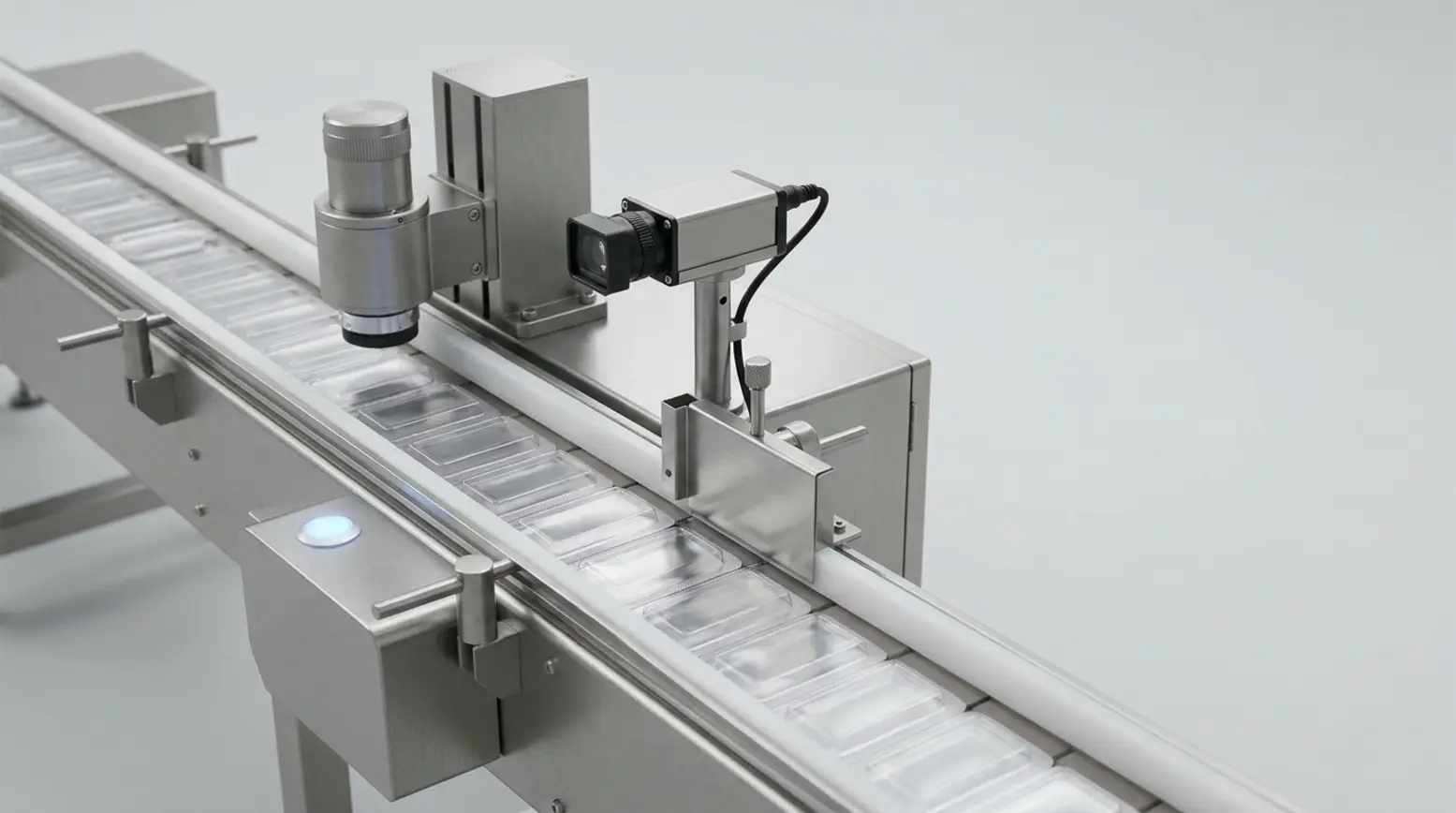
On a physical line, serialization takes the form of dedicated stations with specific tasks. These typically include stations for printing, reading, inspection, rejection, and downstream grouping. The precise layout depends on the serialized level, line speed, pack orientation, and the available space after sealing. This is where blister line serialization integration becomes visible through hardware, controls, and transfer logic.
Printing and coding
The code should be applied when the pack presents a suitable printable surface and is moving in a controlled flow. This point may be located on the blister machine, on a cartoner, or at another downstream station. For direct marking, buyers need to specify the print area, surface condition, orientation, and data content. These details help identify the most appropriate pharmaceutical serialization equipment, whether the solution requires a compact print head or a comprehensive print station complete with guarding and controls.
Scanning and code reading
After printing, the code must be read and verified. The reader checks whether the applied code can be processed by the intended system and confirms that it matches the active job. The success of this step depends on pack position, line speed, and code quality. Therefore, the line requires stable spacing and precise presentation around the reading point. On certain lines, this forms part of an integrated print-and-verify packaging concept, where printing and checking are tightly linked.
Vision inspection
A packaging vision system setup checks specific visual features. It may confirm code presence, code position, readability, and various print quality metrics. It can also verify label presence or other visible pack details. However, its role must remain clearly defined. It checks what the camera can capture within set limits; it does not, however, verify every product detail or database record.
Reject handling
A packaging reject system demands the same attention as the printer and reader. If a code fails, the line must remove or isolate the affected pack and confirm the action taken. This is vital because an unconfirmed reject creates lingering doubt regarding pack status. Reliable reject handling also supports restart logic after a line stop, as the operating team must know which packs remain valid on the line and which require rework.
Common station table
Station: Printer or coder. Main task: Apply the unique code. What to check in the specification: Print area, surface, orientation, and job data interface.
Station: Scanner or code reader. Main task: Read and confirm the code. What to check in the specification: Reading position, speed, pack spacing, and expected code quality.
Station: Vision inspection. Main task: Check visible features. What to check in the specification: Camera field, lighting, pass criteria, and image handling.
Station: Reject point. Main task: Remove or isolate failed packs. What to check in the specification: Trigger signal, physical path, confirmation, and rework route.
Station: Aggregation point. Main task: Create parent and child links between pack levels. What to check in the specification: Grouping method, scan logic, and data handling at that point.
How blister line serialization integration works with line controls and software
Line control is essential because every station requires accurate timing and status signals. The printer, scanner, camera, reject point, line controller, and site software must seamlessly exchange clear job and event information. For a broader perspective on how these systems work together, our guide to packaging automation explains the overarching automation context.
Required handshake between stations
The printer requires correct job data and status control. The scanner and vision system need to know precisely what to check and when to check it. The reject point must receive a definitive signal for removal or isolation, and the line controller must accurately record the result. Likewise, the facility's serialization software requires a reliable connection to the machine layer. This ensures that serialization line integration remains consistent across both hardware and data flows.
Normal line events that must be specified
Stops, restarts, rejected packs, rework routines, job changes, and changeovers are standard considerations in any project. Following a line stop, the team needs to know whether partly processed packs stay on the line, move to the reject bin, or go to rework. During a job change, the line must inherently prevent mixing one code set with another. These rules should be agreed upon prior to the build and test phases, since they impact both machine controls and operating procedures.
Why serialization is not a software only project
While software manages the data, overall line performance still relies heavily on hardware timing, pack spacing, orientation, and reject confirmation. A printer cannot compensate for poor pack presentation, and a scanner cannot rectify unstable transfers between stations. Therefore, a well-designed setup treats serialization as a machine project equipped with software interfaces, rather than viewing it solely as a software issue.
Downstream flow after blister line serialization integration
After blister sealing, the serialized unit may actually be processed further down the line. If the carton is the saleable unit, coding, reading, and inspection typically occur downstream of the sealed blister. For this reason, buyers should look beyond the sealing station and include transfer, cartoning, and grouping points within their project scope. For additional context, our article on secondary packaging equipment details the broader downstream path.
When coding happens downstream from the sealed blister
Carton-level serialization is common because the carton generally offers a superior print surface and more space for code placement. However, the blister machine still plays a vital role, as it must discharge the product in a stable and controlled manner. The primary coding hardware, though, may be situated on the cartoner itself or further downstream. In such scenarios, the machine concept must account for the transfer quality from the blister output to the carton handling stages.
Aggregation on the packaging line
Aggregation involves creating parent-child relationships when serialized units are grouped into cartons, cases, or other higher packaging levels. This typically occurs at defined grouping points on the line, where specialized scanning and data handling are introduced. An aggregation packaging line thereby builds traceability through physical grouping events, and these events must perfectly mirror the actual product flow.
What aggregation changes, and what it does not change
Aggregation adds scanning and data handling capabilities wherever units are combined. It may also introduce necessary guarding, controls, and quality checks at those specific points. Importantly, it does not alter the core sealing principle of the blister machine itself. The forming and sealing processes remain unchanged, while the downstream line gains additional control points that support the broader serialization packaging line.
Practical example
Consider two straightforward project routes. In the first route, the blister card acts as the serialized unit. Here, the line requires a coding point situated on or near the blister process, followed by reading, vision inspection, and confirmed reject handling. In the second route, the carton serves as the serialized unit. The blister machine focuses solely on stable output, while coding and verification shift to the cartoner path, followed by potential aggregation at the case packing stage. In either scenario, the specific packaging need dictates the machine concept.
Choosing a machine setup for the line
The ideal setup depends on the pack, the production pattern, and the required level of automation. Working alongside the customer, we can specify a standard or customized setup that includes automatic feeding, printing, scanning, and vision systems where necessary. You can explore our range of pharmaceutical packaging machines when transitioning from defining line requirements to selecting machinery.
Standard or customized setup
Some projects are well-suited to a standard machine with supplementary stations. Others require a more customized layout because the print area is limited, the downstream flow is fixed, or changeover procedures are especially demanding. A fair and comprehensive supplier comparison should evaluate station layout, signal exchange, reject logic, space requirements, and maintenance access. This ensures that engineering, operations, and procurement teams can compare options on a like-for-like basis.
Match the machine to the pack and the line
Thorough knowledge of the pack helps accurately specify the machine interface, since material, shape, and handling characteristics directly influence where coding and checking can occur. Even if the serialized unit is downstream, the machine must still provide the correct discharge, orientation, and transfer to support subsequent stations. If direct marking is required, the setup must support the print point in a highly controlled manner.
Equipment supports the process, but validation stays with the customer
Equipment can facilitate compliant production through stable handling, precise code application, reliable inspection, and controlled rejection. However, no machine can guarantee compliance on its own, and no supplier can replace the customer’s own validation processes. The customer must define the specific market obligations for the products and countries involved, and the machine specification should support that validated process as clearly as possible.
Practical questions buyers ask
Does every blister pack need a unique code?
No. The primary question is which packaging level must carry the unique identity. In some projects, the blister card serves as the serialized unit. In many others, the carton or an alternative saleable pack carries the code.
Can the code be placed on the carton instead of the blister?
Yes. This is often the most practical choice, as a carton generally offers a superior print surface and more room for code placement. When this approach is taken, the main coding, reading, and inspection stations are situated further down the line.
What should a reject station confirm?
A reject station should definitively confirm that a failed pack was successfully removed or isolated. It should also maintain a clear event record, ensuring the team knows the exact pack status following a print failure, read failure, or inspection failure.
Does a vision system prove compliance?
No. A vision system evaluates specific visual features, such as code presence, position, and readability, within predefined limits. While it helps control the process, it does not verify every single product detail or database status.
What information should we give a machine supplier before layout starts?
Provide the supplier with pack dimensions, packaging levels, code location, code carrier, print area, surface details, orientation, product formats, and expected changeovers. Additionally, outline existing downstream equipment, available space, reject handling rules, aggregation points, and the logic behind stops, restarts, job changes, and rework. Armed with this information, the supplier can define the ideal machinery and interfaces much more accurately.
Next step for your line concept
If your line concept remains open, request a free Quick Scan so we can review your packaging levels, station layouts, and interface risks early in the process. If you already have specific questions regarding printers, scanners, vision systems, reject handling, or connecting to an existing line, please contact us to discuss your required setup. We can help you define a practical machine concept that perfectly accommodates your pack and the rest of your production line.